


 English
 Hrvatski
 Slovenščina
 Српски
 Македонски
 Deutsch
 Português (BR)
 Italiano
 Español
 Français
 Slovenčina
 Ελληνικά
 Čeština
 Dansk
Dansk Eesti
Eesti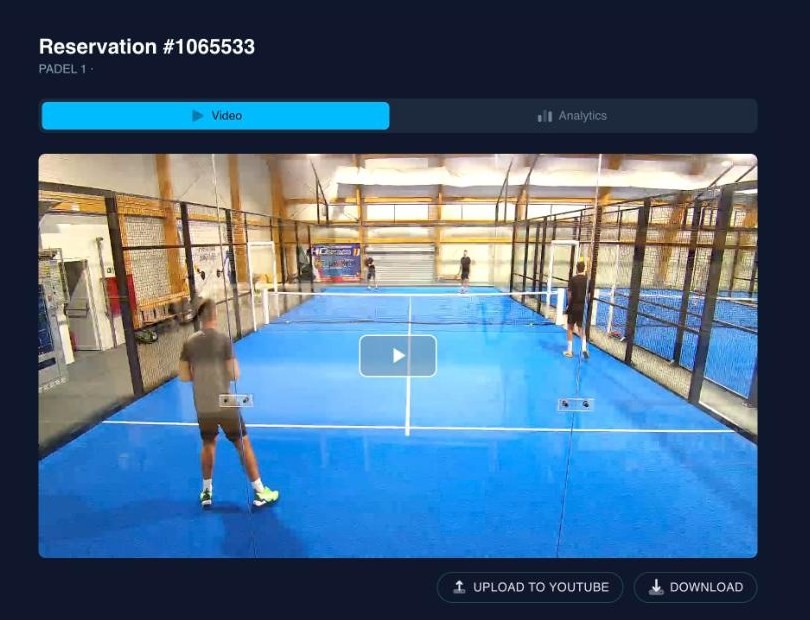
How to Record Matches on Club Courts Automatically
How clubs record members' matches from a court camera without anyone filming — what camera to buy, how the booking starts and stops the recording, and how players get their video onto YouTube.
Ask any club that has put a camera on a court what happened next, and you will hear a version of the same story. The camera works. The footage exists. And then a member asks for "the video from Tuesday", and somebody spends twenty minutes scrubbing through a day of continuous recording, exports a clip, and tries to send a two-gigabyte file over WhatsApp.
The camera was never the hard part. The hard part is knowing which ninety minutes matter, whose they are, and how they get to that person without anybody doing work. That is a booking-system problem, not a camera problem — and it is why court video belongs in the same system as the bookings.
This guide covers how that works: what camera to buy, what the club has to configure, what the member sees, and what happens to the footage afterwards.
What the player gets: their booking, recorded, waiting in their account. Padel Karlovac, on SportyPlus.
The problem with "we installed a camera"
A court camera left to itself produces one thing: an unbroken stream of video that nobody has asked for. Everything useful about it has to be added by hand.
- Someone has to find the match in the timeline.
- Someone has to decide whether this member is allowed to have it.
- Someone has to get a large file out of the building.
- Someone has to delete old footage, or the storage bill grows forever and the club quietly accumulates months of video of identifiable people, which is a data-protection problem waiting for a complaint.
Every one of those steps is manual, and every one of them is the kind of task that gets dropped the week the club is busy. Clubs usually discover this about three months in, and the camera becomes a thing that is technically installed.
How clubs normally handle it
The traditional answer is a dedicated match-recording product: a proprietary camera, a proprietary app, a per-court subscription, and a separate account for the player. These work. They are also a second system, with a second login, a second support contact, and no idea what your bookings are — which means the player has to remember to press record, or to tell the app which slot was theirs.
The other common answer is a phone on a tripod. Free, and about as reliable as you would expect.
The recommended approach: let the booking drive the camera
The rule worth building everything else on is this: the booking is the instruction. The club does not schedule recordings. The player does not press record. The reservation already says which court, which time, and which people — so it already contains everything the camera needs to be told.
Concretely, that means four things should be true:
- The court knows it has a camera. Recording is offered only on courts that can do it.
- The player opts in when booking, in the same step where they choose the court and pay.
- Recording starts and stops on the booking's own clock, with no human involved.
- The finished video belongs to the player who booked it, and appears in their account without anyone sending anything.
Everything below is how SportyPlus implements that, but the design is worth copying regardless of what software you run.
Any camera that speaks RTMP
There is no SportyPlus camera to buy. The requirement is one line: the camera must be able to push an RTMP stream, which is a standard feature on essentially every IP camera sold for professional installation — Dahua, Hikvision, Reolink, Axis and the rest — and on many action cameras and encoders too.
Setup is deliberately dull. In the club admin you create a camera, give it a name, and pick the court it points at. The system issues an RTMP URL with its own stream key. You paste that URL into the camera's own streaming settings. That is the integration.
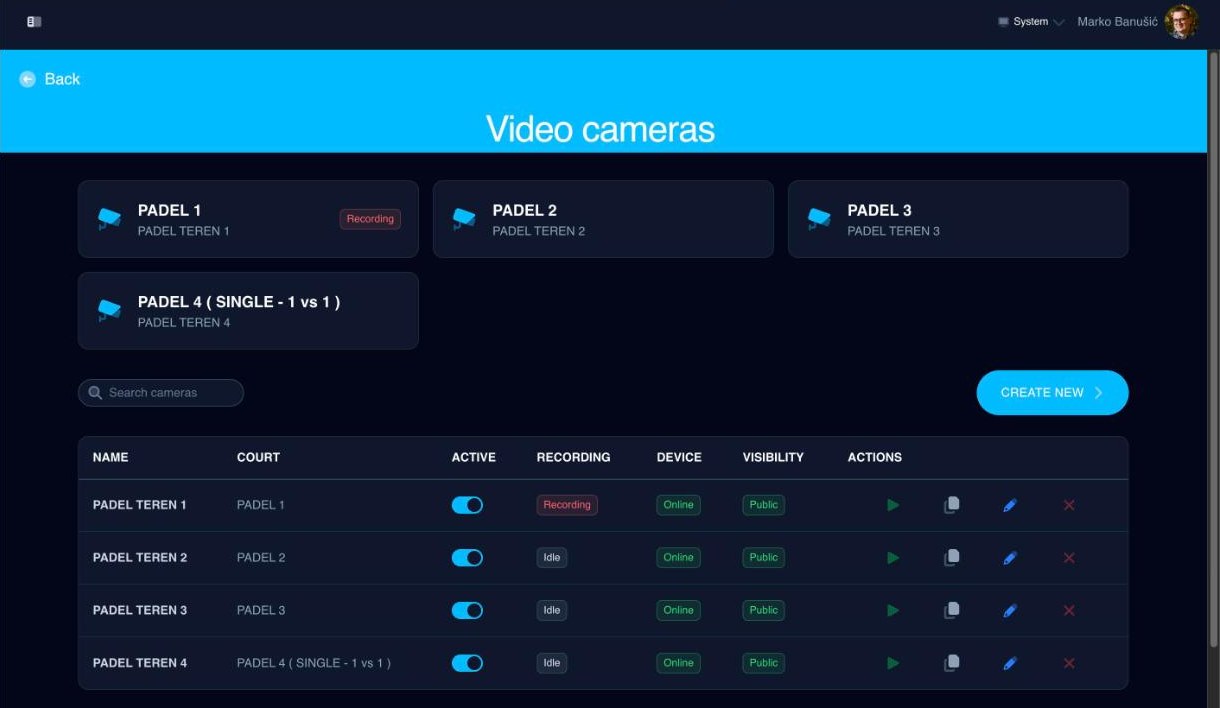
Four courts, four cameras. The one showing "Recording" has a booking on it right now — nobody at the club started it.
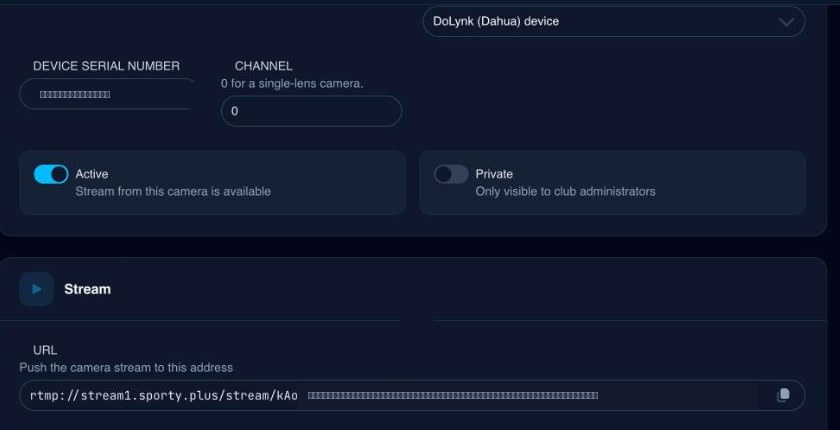
The whole integration: copy this address into the camera's streaming settings. The stream key is masked here.
That choice matters commercially. A club with cameras already installed for security can often stream from the hardware it owns. A club buying new can buy on price and picture quality from any supplier, rather than from whoever makes the recording platform.
The settings that actually decide whether it works
A camera that pushes RTMP successfully can still produce nothing usable. In practice, the same handful of settings account for nearly every failed installation, so specify them to your installer up front:
| Setting | Value | Why |
|---|---|---|
| Video codec | H.264 | H.265 streams and then plays back nowhere. It fails silently. |
| Audio codec | AAC | Any other codec produces a video with no sound at all. |
| Stream | Main stream | A camera pushing its sub stream sends a low-quality picture and ignores your main-stream settings, which looks exactly like the settings not saving. |
| Resolution / bitrate | 1080p at around 4 Mbps | Nothing re-encodes on the way to a viewer, so every person watching pulls the source bitrate. |
| Keyframe interval | 1 second (30 at 30 fps) | This is the single setting that decides how far behind live the picture runs. Video is cut on keyframe boundaries, so a camera sending a keyframe every 25 seconds puts live view more than a minute behind the court. |
| Bit rate type | CBR, Smart Codec off | Variable and "smart" modes drop quality exactly when there is movement — which is the whole point of a match recording. |
| Time zone | UTC, DST off | A camera an hour out records the wrong hour, twice a year. |
Two of these — codec and audio — fail in a way that gives you no error message anywhere. If a new camera streams nothing, or streams silently, check those first.
The SD card is the safety net, not the plan
Any camera with a memory card should be set to record to it continuously, around the clock, with overwrite-on-full. The live stream is what normally produces the video; the card is what saves the club when the internet drops mid-match. On Dahua devices reachable through their cloud service, SportyPlus can read that card and repair a recording that lost minutes to a network glitch, pulling the missing stretch back off the camera automatically.
A club without that capability still benefits from the card, just manually.
What happens during a booking
Once a court has an active camera, the recording add-on appears in the booking flow — the same list where members add anything else to a reservation. The player ticks match recording and books as normal.
From there:
- The system checks every minute for bookings that have just started on a camera court and starts the recording, naming it after the reservation.
- The booking's first participant is recorded as the owner of the video.
- When the booking's end time passes, the recording stops and the file is stored.
- The video appears in that player's account, where they can watch it, download it, or send it to YouTube.
Nobody at the club touches any of it. An administrator can see every camera and every recording, but nothing waits on them.
A worked example
A hypothetical padel club: four courts, cameras on two of them, roughly 40 booked hours a week across the two camera courts.
Before, recording was a favour — a member asked, someone at the desk went looking, and it happened maybe twice a month because it was nobody's job. Now, suppose a quarter of bookings on those courts tick the add-on. That is around 10 recordings a week that the club produces at zero marginal staff cost, each one attached to the person who paid for the court.
If the club later charges a flat fee for the add-on, the same 10 recordings a week become a revenue line on courts that were already booked. If it stays free, it is a differentiator on the two courts the club would most like people to book. Either way the operational cost is the same: nothing.
Sharing: the player's own YouTube channel
The last mile is the one most clubs get stuck on, because match video is large and email is not.
SportyPlus solves it by uploading to the player's own YouTube channel, not the club's. The member connects their Google account once, from the page where they are watching their recording. After that, sharing a match is: press the button, give it a title, pick a privacy setting, done.
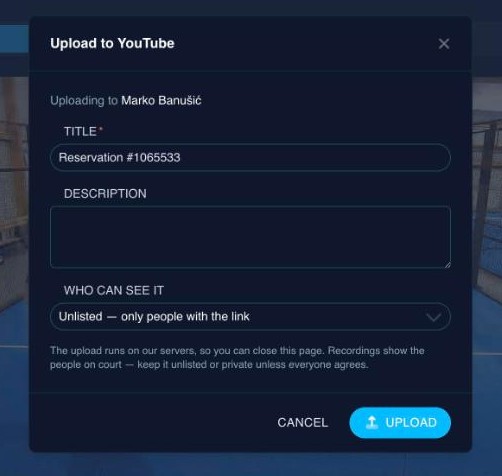
Uploading to the member's own channel. Unlisted is the default, and the dialog says why.
A few details worth knowing, because they are deliberate:
- The upload happens server-side. The file goes from our storage straight to YouTube. Nothing has to download to the member's phone first, and closing the browser does not interrupt it. If a chunk fails, it resumes from the byte it reached rather than starting over.
- The default privacy is unlisted. The recording shows identifiable people on a court. It becomes searchable only if the member deliberately chooses public; they can also pick private, visible to nobody but themselves.
- The grant is per member, never per club. The video is published by the player, on their channel, under their name. The club is not in the middle of it — which is also the honest answer to "who is responsible for this video being online".
That last point is worth dwelling on, because the alternative — the club uploading footage of its members to a club channel — is a consent conversation most clubs do not want to have, on every single match.
Retention and privacy
Continuous court video of named people is personal data, and the reason most clubs should not keep it indefinitely is not storage cost.
SportyPlus keeps a recording for 30 days and then deletes it — file and record together — automatically. That window is chosen to be long enough for a player to notice, watch and keep what they want, and short enough that the club is not sitting on a year of surveillance-grade footage of its membership. A player who wants a match permanently sends it to their YouTube channel, where it becomes theirs to keep.
If you are specifying this yourself, pick a number, write it into your club's privacy notice, and make sure something actually enforces it. A retention policy nobody implements is worse than no policy, because it is a written promise you are visibly breaking.
Beyond recording: live view and analysis
Two things come more or less free once a camera is streaming to the booking system.
The first is live view. The same stream can be watched while the match is happening — useful for a parent who cannot get to the club, or a coach watching a second court. Cameras can also be marked private, so a club can record matches without publishing a live window into its courts.
The second is automatic analysis. Once a recording exists and is tied to a court, a booking and a sport, software can go through it: track the players, track the ball, and produce movement heatmaps and rally statistics. In SportyPlus this is a separate opt-in on top of the recording, with its own consent step, precisely because processing video of people is a bigger ask than storing it for a month.
Neither needs new hardware. They need the camera to have been wired into the booking system in the first place, which is the argument for doing it that way from the start.
Practical recommendations
- Start with one court, not the fleet. Put a camera on the court that gets the best matches — the show court, or the one the league plays on — and see how many people tick the box before buying four more.
- Specify the codec settings in the purchase order. H.264, AAC, main stream, CBR, one-second keyframes. Handing your installer that line saves a return visit.
- Check where the camera can see. A camera framed on one court that also covers the club terrace is a different, harder privacy conversation. Frame it on the court.
- Put up a sign. Recording is visible, signposted and opt-in, or it is a problem. This costs nothing and settles the issue before it starts.
- Wire power and network before the camera arrives. Court-side network runs are the part of this project that actually takes time; the software configuration is ten minutes.
- Decide the price before you launch, not after. Free-then-charged is a much harder message than a modest flat fee from day one — and the fee is per booking, so members can predict it.
- Do it at the same time as any other court electrical work. If you are already re-lighting or fitting booking-driven access control and lighting, the electrician is on site and the trenches are open.
Related questions
Do we have to buy special cameras? No. Any camera that can push an RTMP stream works, which covers most professional IP cameras and many encoders. You paste the URL the system gives you into the camera's streaming settings.
Who owns the recording? The player who booked the court. It appears in their account, and if they send it to YouTube it goes to their own channel under their own name — not the club's.
What happens if the internet drops during a match? The live stream stops, so that stretch is missing from the recording. This is why cameras should also record continuously to their own memory card; on supported devices SportyPlus can pull the missing minutes back off the card and repair the recording automatically.
How long is footage kept? Thirty days, after which the file and its record are deleted automatically. Anything a player wants permanently, they upload to their own YouTube channel.
Can members watch a court live? Yes, where the club allows it — the same stream that gets recorded can be watched live. Cameras can be marked private if the club wants recordings without a public live view.
Can we charge for it? Yes. Recording is an add-on to the booking, so it is priced and paid alongside the court itself rather than invoiced separately.
Does every booking on that court get recorded? No. Only bookings where someone ticked the add-on. A court with a camera does not record its empty hours, and members who do not want to be filmed simply do not opt in.
Court video works when the booking system is the thing driving the camera — and when the player, not the club, ends up holding the video. Manage court bookings, add-ons and payments with SportyPlus, or read how the same booking data opens the gate and turns on the lights.