


 English
 Hrvatski
 Slovenščina
 Српски
 Македонски
 Deutsch
 Português (BR)
 Italiano
 Español
 Français
 Slovenčina
 Ελληνικά
 Čeština
 Dansk
 Eesti
 Polski
 Magyar
Sports School Registration Form: How to Move Enrolment Online
How to replace a paper sports school registration form with an online one that records each consent separately, applies the sibling discount, lets the school review every child, and starts the monthly fees without anyone retyping a thing.
A sports school registration form should do four things: collect the child's and parents' details once, record each consent the parent gives (or refuses) separately with the wording they saw, tell the school who is asking for a place, and, once the school says yes, start the fees without anyone typing the form in again. A printed form does the first one, badly, and none of the others.
This guide covers what an online enrolment form should ask, how to handle consent properly, how to deal with sibling discounts, and how a school can review requests and turn them into billing with one click.
Why the paper form keeps causing work
Most children's sports schools (football, basketball, swimming, gymnastics, tennis academies) still enrol the same way. The club publishes a PDF. A parent prints it, fills it in by hand, signs a page of consents and payment terms, and gives it to the coach at the first training. The coach passes a stack of forms to whoever runs the office, who types them into a spreadsheet, a membership list and an invoicing tool.
Every step leaks:
- Handwriting. A misread email address means the monthly invoice never arrives. A misread phone number means nobody can reach the parent when a training is cancelled.
- Missing pages. The consent page is the one that gets left at home.
- Bundled consent. Most paper forms put data processing, photos for social media and the payment terms under one signature. The parent cannot say yes to training and no to photos, so the club cannot tell later who actually agreed to what.
- Discounts by memory. "Second child pays 25% less" is applied by whoever notices the surname.
- No record of the version. When the club changes its terms next season, nobody can show which wording a family signed in 2026.
- The September peak. All of this lands on one or two people in the same three weeks.
How schools usually patch it
Some clubs move the PDF to a fillable PDF or a generic form builder. That fixes the handwriting, but the answers still land in a spreadsheet that someone copies into the membership system, the consents are still one checkbox, and the fees still start only when someone sets them up by hand.
Others let coaches add children directly in their club software. That is faster, but the parent never sees or agrees to anything. The club then has a child's personal data and nothing that shows on what terms it was given.
What a good online enrolment form looks like
Collect each fact once, in the right place
Split the form into what belongs to people and what belongs to this enrolment:
- The child: name, date of birth, gender, personal identification number where your country uses one (OIB in Croatia, for example), and address. These belong on the child's member profile, where the coach and the office will look for them all season.
- The parent: name, email and phone, from the parent's own account rather than retyped every year. A second parent's contact details are worth asking for as an optional section.
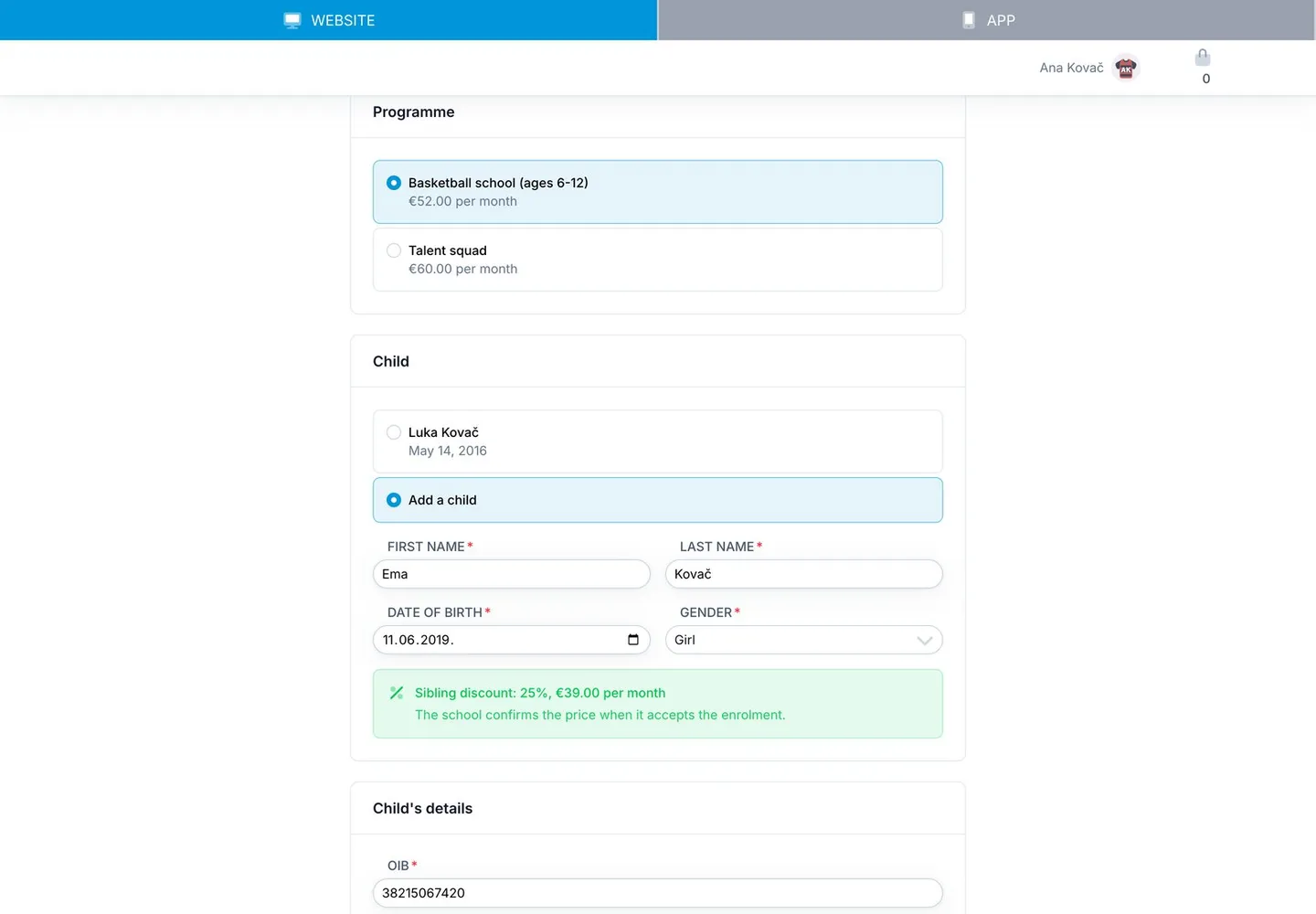
- This enrolment: the programme, and the club's own questions: which school or kindergarten the child attends, the preferred training hall, kit size, whether they have played before, anything the coach should know about their health.
The child should have their own record, linked to the parent, rather than living inside the parent's account. How to manage junior members and their parents explains why that structure matters for bookings, invoices and medical certificates.
Give every consent its own checkbox
Under the GDPR, a request for consent has to be clearly distinguishable from other matters (Article 7(2)), consent must be as easy to withdraw as to give (Article 7(3)), and it should not be a condition of a service that does not need it (Article 7(4)). In practice that means:
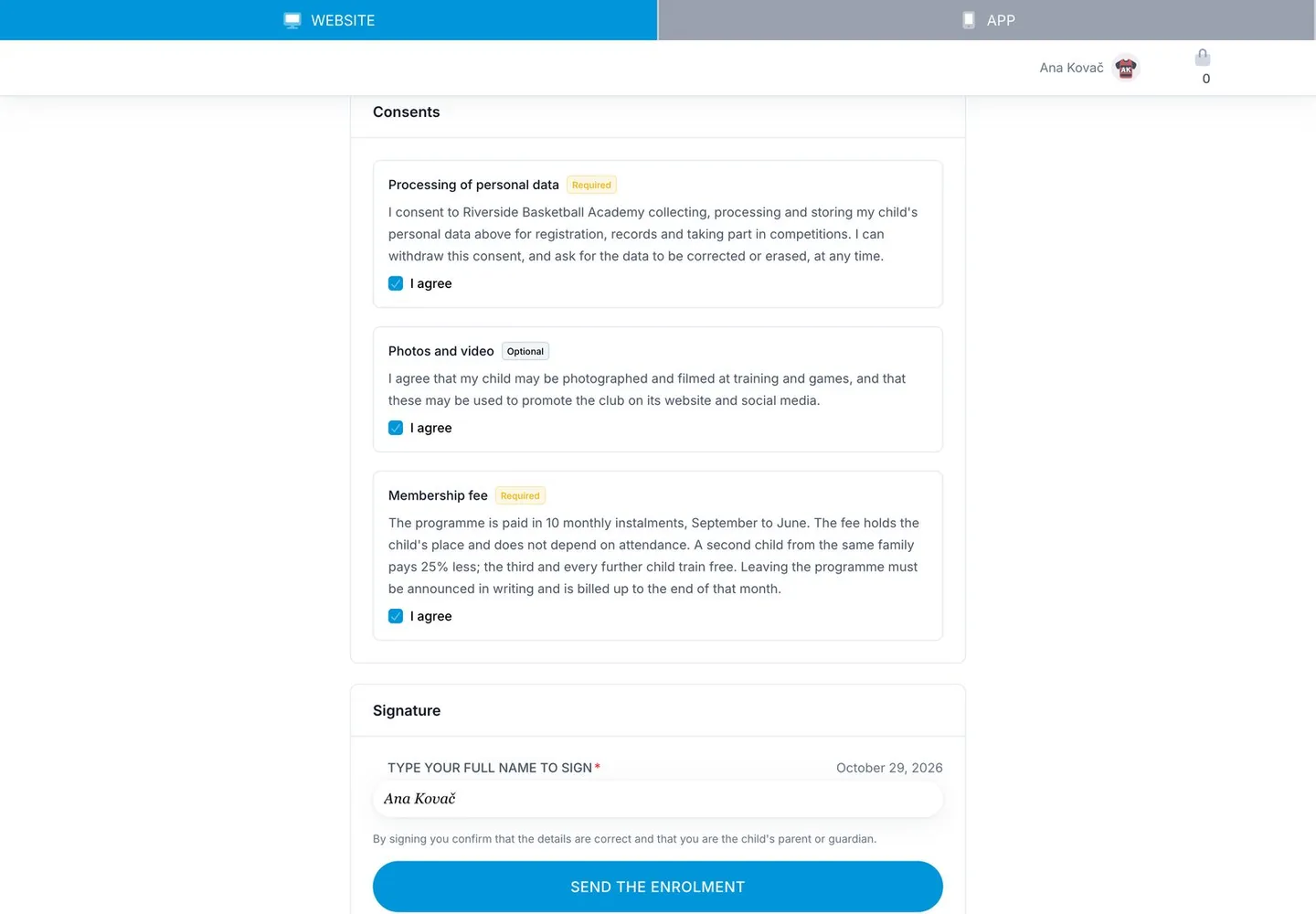
- Separate the things a parent must accept from the things they may refuse. The payment terms and the data the school needs to run the programme are a condition of enrolling. Photos and videos for the club's website and social media are not, so a parent who refuses them must still be able to enrol.
- Mark each clause as required or optional, and only block submission on the required ones.
- Record the refusal too. "Did not consent to photos" is information the person posting on Instagram needs.
Much of the data a school collects to run a programme is processed to perform the enrolment agreement rather than on consent. That is a legal question for your own data protection adviser. Whatever your lawful basis, separate checkboxes with clear wording are what let you show later what a parent agreed to. (This article is not legal advice.)
If a child signs up for anything on their own, the age of digital consent applies: 16 in Croatia, between 13 and 16 elsewhere in the EU. See the age of digital consent by country. An enrolment form filled in by the parent avoids that question.
Keep a copy of exactly what was signed
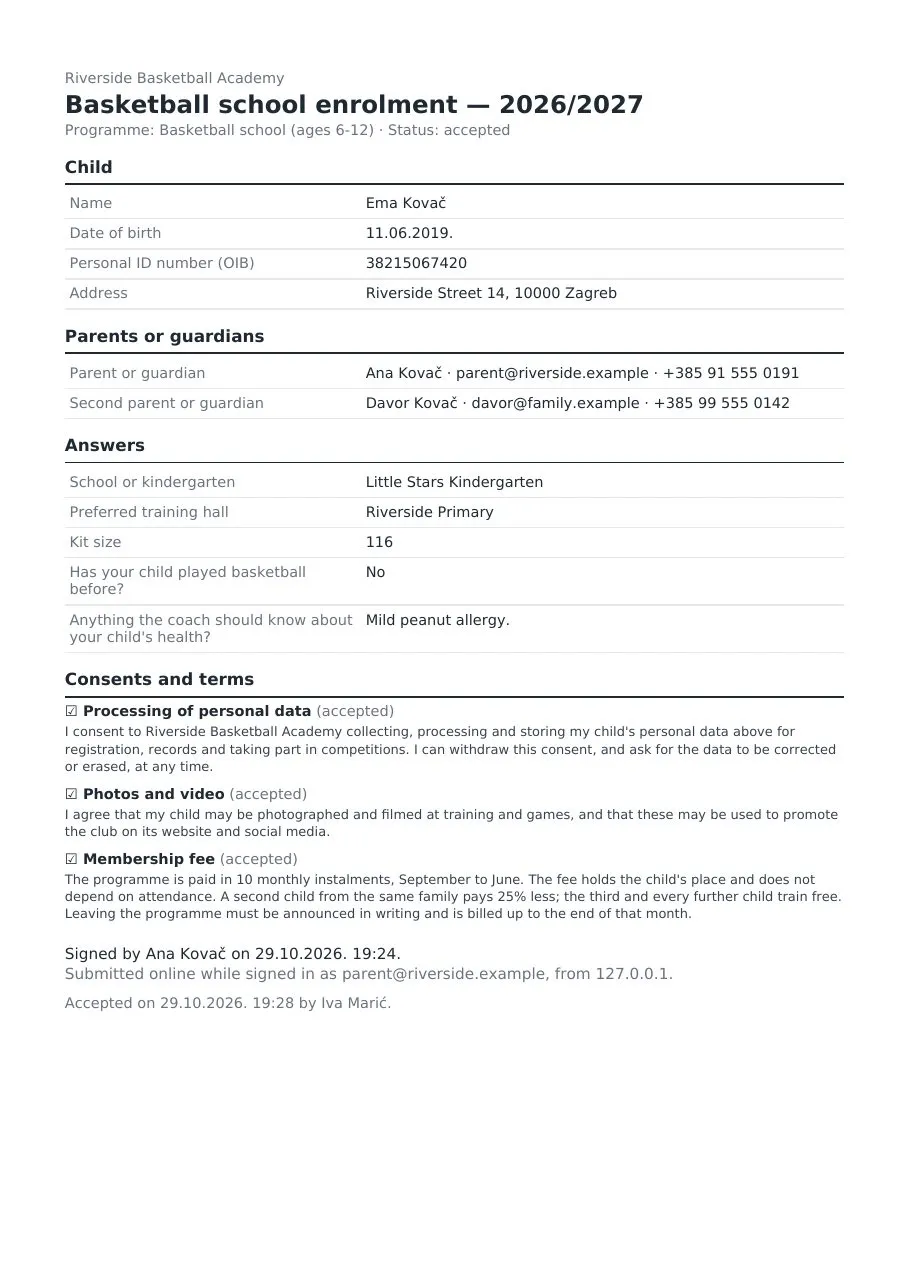
Store a snapshot of the form with every request: every question as it was worded and every clause's full text, plus who submitted it, when, and their typed name as the signature. Next season you will edit the terms. The enrolments already signed must keep the old wording, not silently pick up the new one. Send the parent a copy of what they agreed to, and keep a printable version for the club's files.
Treat health answers as sensitive. If your form asks about allergies or conditions, that is special-category data under the GDPR. Limit who can see it, and store it encrypted if your system allows.
Let the school review before anything is billed
Most schools want to see a request before the child is in: is the group full, is the child the right age for the programme, is this the right hall? So a submission should arrive as a request, not a finished enrolment. Staff accept it (possibly into a different programme, or at a different price) or decline it with a reason the parent will read. Schools that take everyone can switch on automatic acceptance.
Apply the sibling discount by rule, not by memory
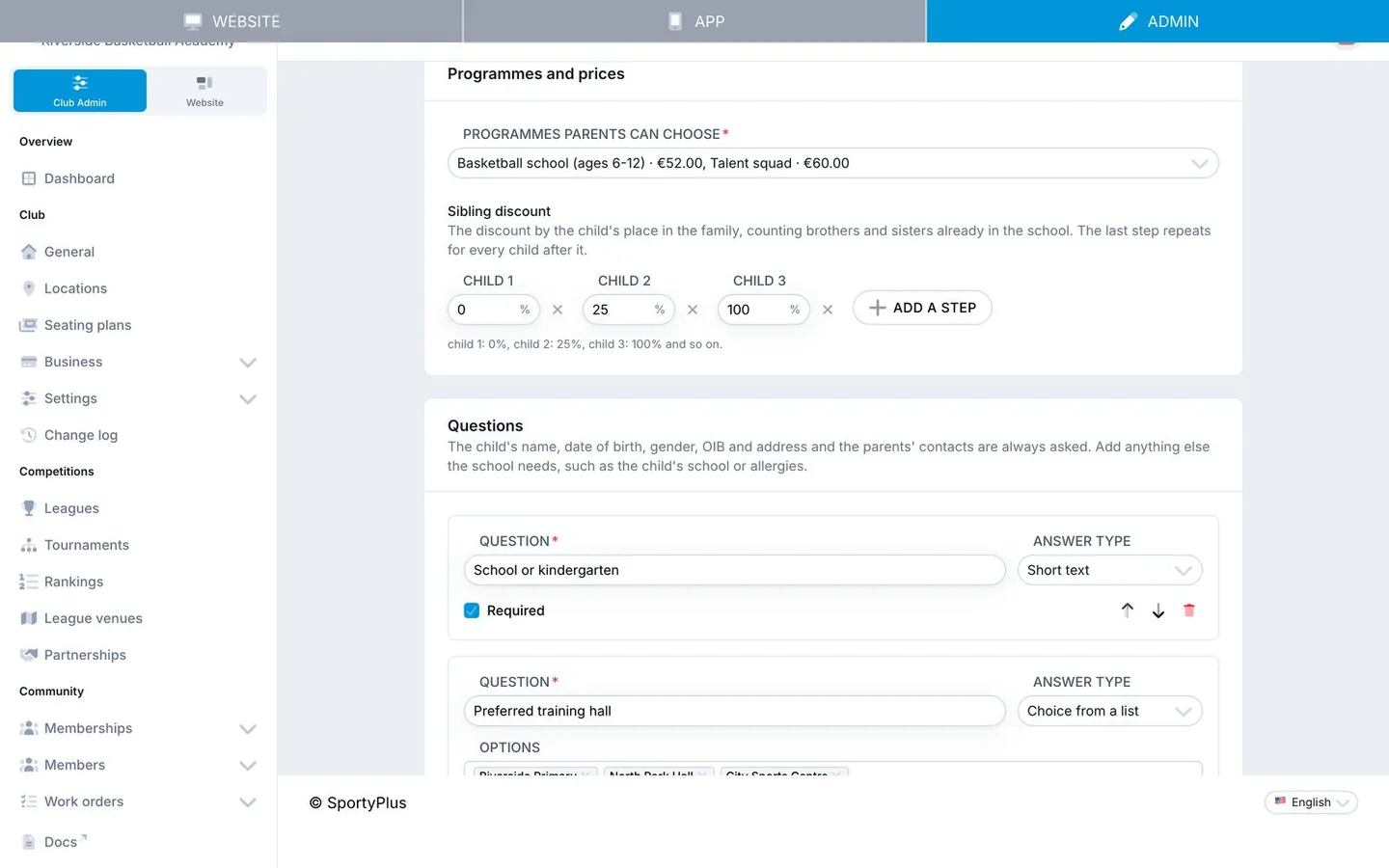
Write the discount down as a ladder by the child's place in the family: for example 0% for the first child, 25% for the second, 100% (free) for the third and every child after. A child's place is one plus the number of brothers and sisters already enrolled in the school, in any programme. Work it out when the school accepts the request, because a sibling may have been accepted in the meantime, and let staff override it.
Make acceptance start the fees
Accepting should create the child's place in the programme at the agreed monthly price, so the school's regular monthly invoicing picks it up. If someone still has to set up billing by hand after accepting, the form has only moved the typing, not removed it.
A worked example
A hypothetical school, to show the flow end to end.
A basketball school runs one programme for children aged 6 to 12 at €52 a month, ten instalments from September to June, and a talent squad at €60. The family discount is 25% off for a second child and free for a third.
In late August the school publishes its enrolment form on the club website, puts the QR code on a poster in three school halls and sends the link to last year's parents.
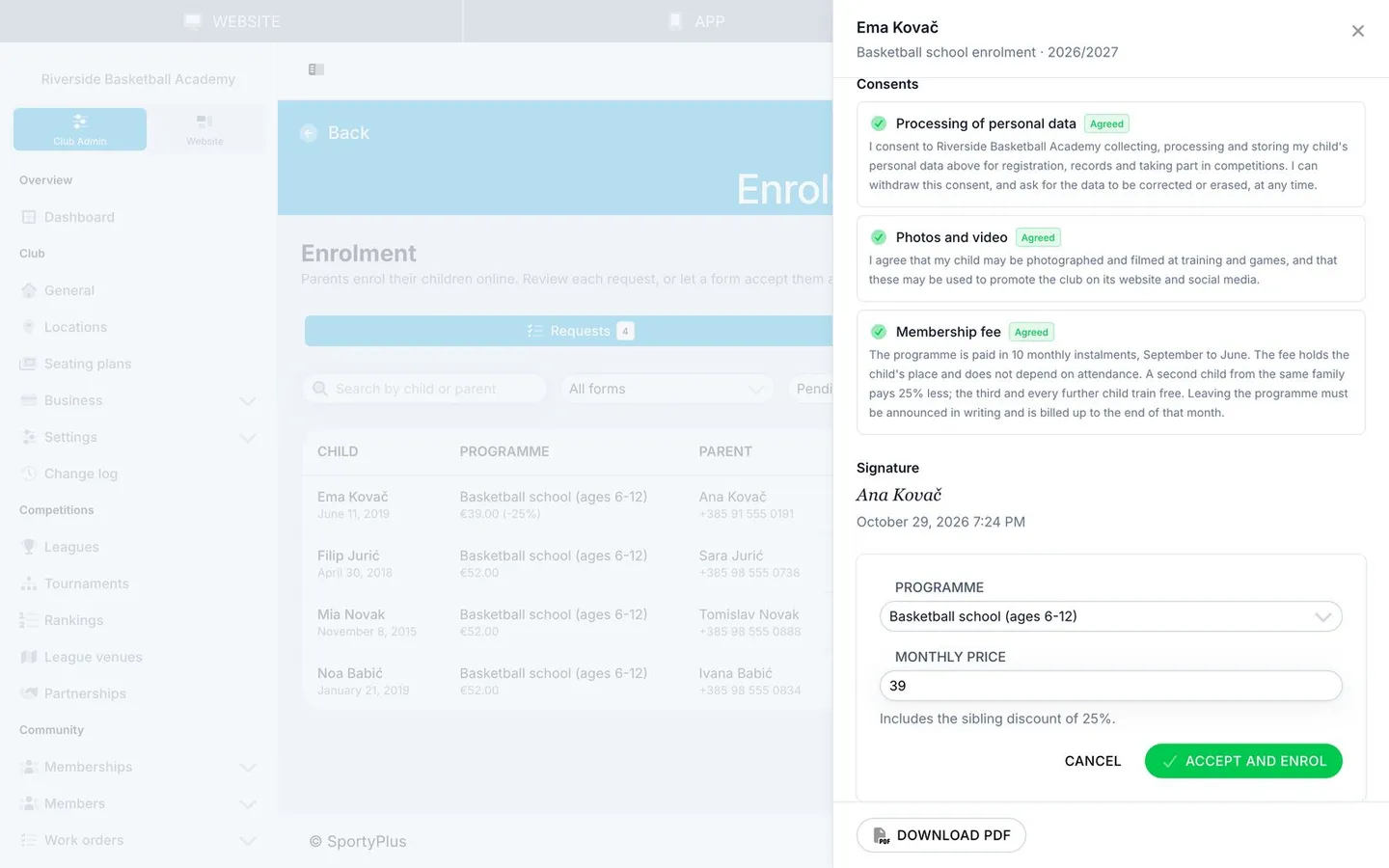
Ana already has one son in the school. She scans the code, signs in, chooses the basketball school, adds her daughter as a new child and fills in her details. Before she signs, the form shows that the second-child discount applies: €39 a month instead of €52. She ticks the data processing and payment terms clauses, also ticks photos and video, types her name and sends it. A copy of everything she agreed to arrives in her inbox.
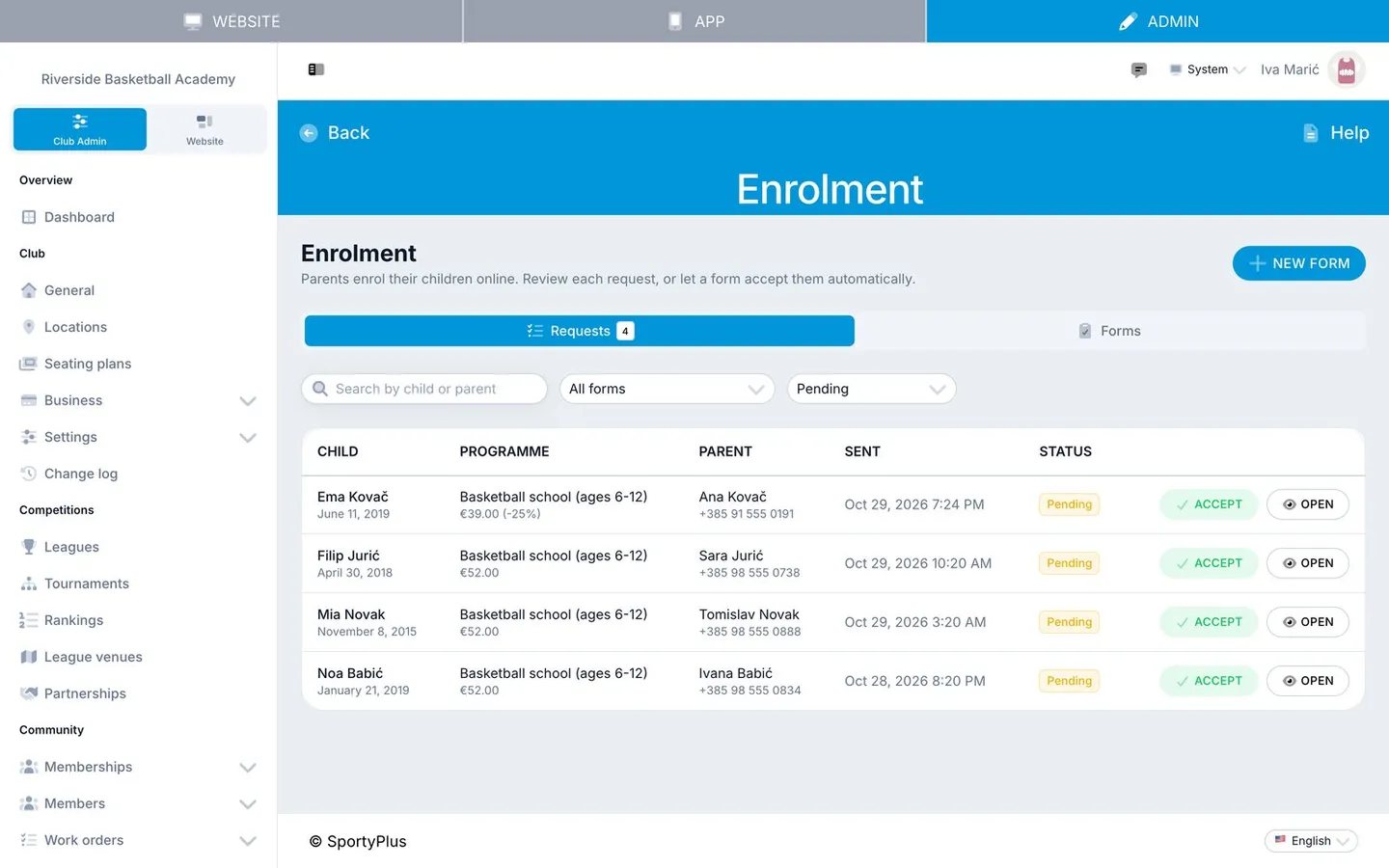
The school's coordinator opens the requests list the next morning. Four families have applied overnight. She opens Ana's request, sees the answers, each consent with its wording and the sibling price, and accepts it. Ana gets a confirmation email. From October, her daughter's €39 instalment is on the school's monthly invoice run with everyone else's.
One parent ticked "no" to photos. The coordinator can see that on the request and on the signed PDF in the club's files.
How SportyPlus handles school enrolment
SportyPlus has online enrolment forms in its sports school module. A club creates a form for a season, picks the programmes parents can choose from, adds its own questions and consent clauses (each marked required or optional), sets the sibling discount ladder, and chooses between reviewing every request and accepting them automatically. The form has its own page on the club website, with a link and a QR code for posters and flyers.
Parents sign in or create an account from the form, pick one of their children or add a new one, and the child's details are saved to the child's profile. The request stores the exact wording the parent saw. Answers and the second parent's details are encrypted at rest. The school sees new requests in the academy admin and gets an email for each one. Accepting puts the child on the school's monthly academy billing at the discounted price. Declining sends the parent the school's reason. Every request can be downloaded as a PDF of the signed form, and parents follow their requests under My enrolments.
Practical recommendations
- Open enrolment before the season, not at the first training. A form that opens in mid-August spreads the work over weeks instead of one chaotic September evening.
- Rewrite your consent page as separate clauses. One for the data you need to run the programme, one for the payment terms, one for photos and video. Make only the first two required.
- Ask only what you use. Every extra question is one more reason for a parent to stop halfway. If nobody looks at the kit size until December, ask in December.
- Write the payment terms in the form, in full. Instalments, what happens with absences, how to leave the programme. That clause is what the parent signs, and what the club points to later.
- Decide your sibling rule once and write it down. Then let the system apply it, and only override it on purpose.
- Keep health questions optional and specific. "Anything the coach should know about your child's health?" is better than a medical questionnaire. Collect medical certificates separately.
- Close the form when the groups are full. Set an end date, or switch it off, so parents are not filling in requests you cannot accept.
Related questions
Is a typed name a valid signature?
For most club purposes, yes. Under EU rules an electronic signature cannot be refused as evidence just because it is electronic. What makes it useful is the record around it: who was signed in, when, from where, and the exact text they agreed to. For contracts that legally need a handwritten or qualified signature in your country, check locally.
Should a parent need an account to enrol their child?
It helps everyone. The account is where the monthly invoices go, where the parent sees their child's training and payments, and where they update their details next year instead of filling in the whole form again. A form that lets parents create the account in the same step keeps the friction low.
What about the second parent?
Collect their name, phone and email on the form so the school can reach them. Giving them access to the child's record should be their own step: they confirm the link from their own account, rather than one parent granting it for them.
Can parents change their answers after sending?
Treat a sent request as signed. If something is wrong, the parent can withdraw a request the school has not decided on yet and send a new one. After acceptance, changes go through the school.
How do I handle a child who leaves mid-season?
That is a question for your payment terms, so write it into the clause parents accept: for example, notice in writing and billing up to the end of that month. Then the school ends the child's place in the programme from that date.
Related SportyPlus guides
- How to manage junior members and their parents: guardian accounts, parental consent and family payments.
- Age of digital consent by country: when children can sign up on their own, country by country.
- How to run a sports club email newsletter: consent for club news, kept separate from enrolment.
Enrol children online and let acceptance start the fees: run your sports school with SportyPlus.